Genius Hack: Attach Files to Your Sign Up

Ever wish you could drop a file onto your sign up? You can! Give your participants all the information they need by attaching that important document, PDF or spreadsheet.
Use Attachments for:
- Waivers for sports team, field trips and church retreats
- Volunteer application forms
- Job interview applications
- Extra information, such as a map with directions
Get Started with Attachments
To begin, upload any attachments you want to share with participants into your GeniusDrive — a cloud storage area inside your SignUpGenius account.
Access your GeniusDrive in the Tools section of your account. Once you're logged in, you can create different folders and upload attachments.
Add an Attachment to a Sign Up
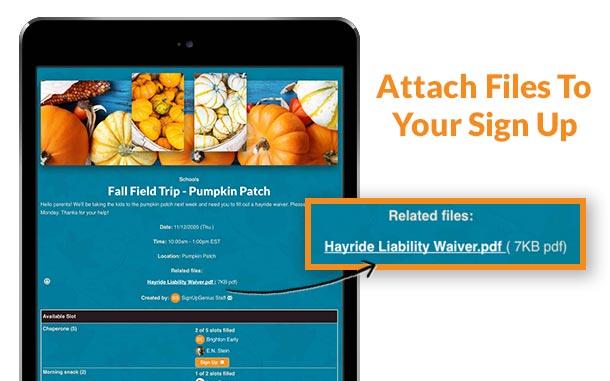
After all the necessary files are uploaded, you can get started or edit your sign up. On the very first step in the sign up creation wizard, open "Advanced Tools" at the bottom of the page.
From there, you can attach any file from your GeniusDrive. It's that simple! Your sign up will include that file at the top, and participants can download when they sign up.
Add Attachment to an Email
You can also attach files directly to email reminders and invitations sent to participants. In the "Messages" area of your account, compose a message and attach a file from your GeniusDrive underneath your message.
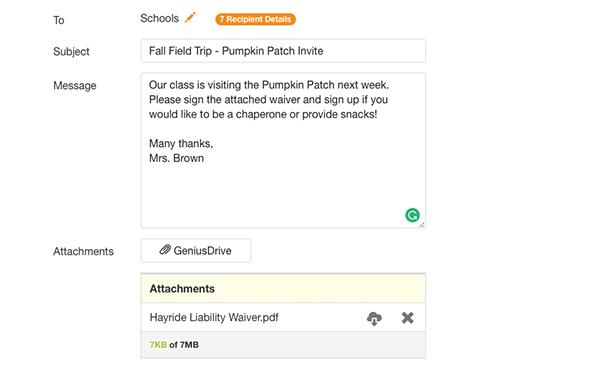
Your participants will receive the attachment with their reminder! No more shortage of forms at the check-in table. That's genius!
Recent Blog Articles


(SignUpGenius's) simplicity, practicality and efficiency is what constantly has us coming back. Using SignUpGenius has allowed us more time to focus on other tasks rather than trying to facilitate scheduling and other factors related to hosting events.
Vicente Sanchez, Stephen F. Austin State University